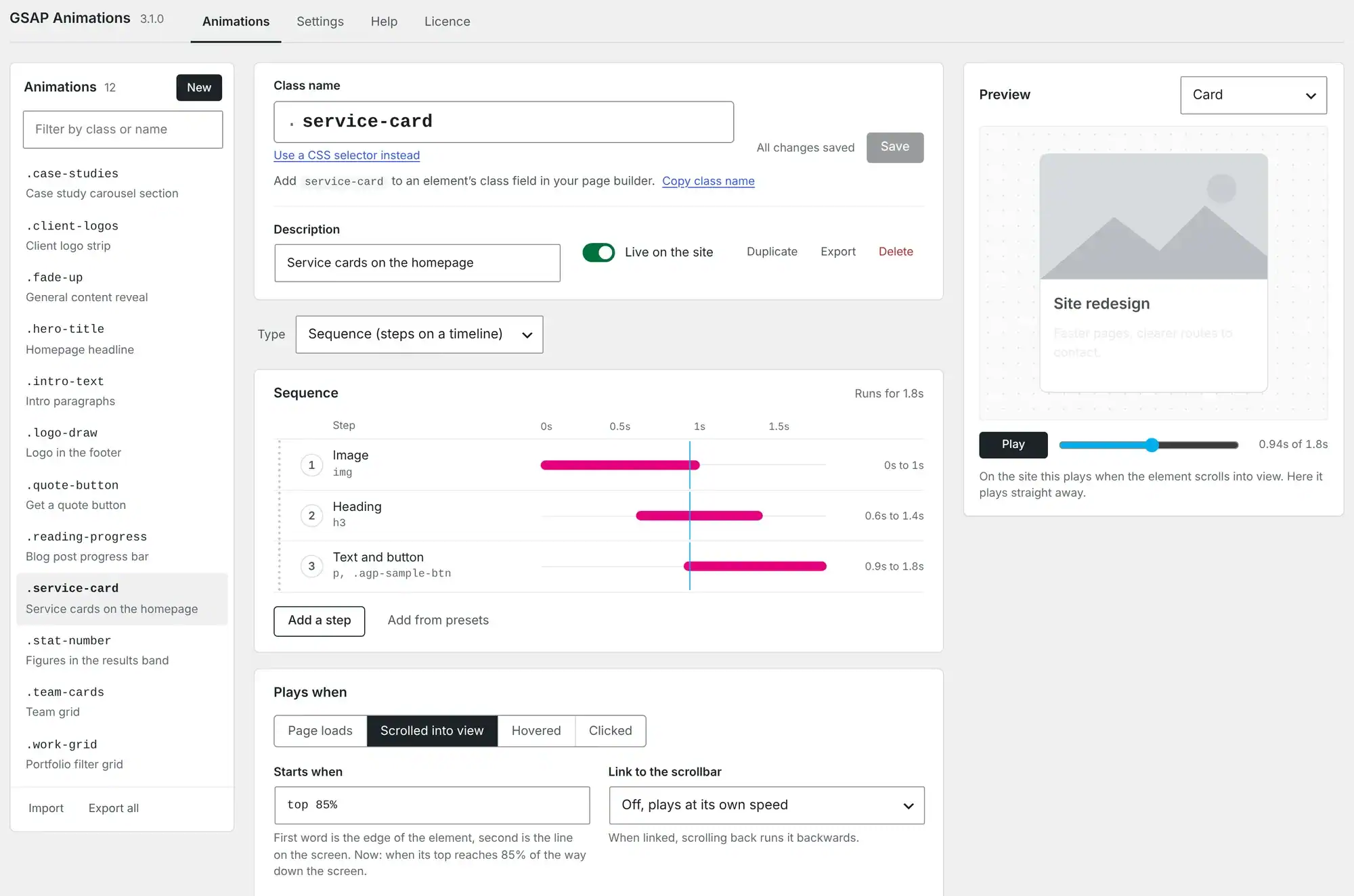
Animate by class name. Change it once and it changes everywhere.
GSAP Animation Generator Pro brings GSAP animation to WordPress without you writing a line of JavaScript. Build an animation once, give it a class name such as fade-up, then add that class to anything in your page builder. Every element carrying the class plays the same animation. Adjust it later and every one of them follows, whether that is a single headline or two hundred product cards.
Impreza and WPBakery give you plenty of entrance effects but very little for proper scroll-led sequences, so we built this to fill that gap on our own client sites. Version 3 is a ground-up rebuild, with a new editor and far more of GSAP to work with.
Sequences, not single effects
Each animation is a list of steps. A step says what moves, how it moves and when it starts. The image wipes in, the heading follows a beat later, then the text and button rise together. Every step appears as a bar on the timeline, so getting the rhythm right is a matter of changing a number rather than guessing.
- Animate the element itself, its children, anything inside it, or its letters, words and lines.
- Animate from, to or between any values: position, scale, rotation, 3D, opacity, colour, blur, clip shape, shadow, corner rounding, size, letter spacing, or any CSS property and CSS variable.
- Start each step after the last, with it, overlapping it, after a pause, or at a set time.
- Stagger items in order, from the middle, from the edges or at random.
- Repeat, play backwards on alternate repeats, and change the speed of the whole sequence in one go.
Text that animates properly
SplitText breaks headings into letters, words or visual lines, and can hide each one behind a mask so text rises out of nowhere. Links, bold and line breaks inside the text survive. Line splits follow the real layout and rebuild themselves when the screen size changes.
There are also typewriter and scramble steps, plus a counter that reads the number already on the page (1,250+ or £4.9m, say) and counts up to it, keeping any symbols around it.
A head start on every animation
Nobody wants to build a fade-up from scratch for the hundredth time. Start from one of 19 ready-made sequences, such as a card that builds itself, a headline whose letters rise or a statistic that counts up, or drop in one of 38 single-step presets for entrances, exits, attention-seekers and hover states. Every one plays as you hover over it, and everything can be changed afterwards.
Eleven ready-made effects
Some things are behaviours rather than sequences, so they come ready-built with a handful of plain settings.
- Endless strip: a logo or text marquee that loops forever, slows to a stop on hover and can show a pause button.
- Sideways scrolling section: the section pins and a row of panels slides across as you scroll down.
- Magnetic: buttons that lean towards the pointer and spring back.
- 3D tilt: cards that tip towards the pointer, with an optional lift.
- Cursor follower: a dot or a “View” bubble that trails the pointer across a card or the whole page.
- Drag carousel: drag, flick and settle on the nearest slide, with arrow-key support.
- Smooth filtering: when a filter shows, hides or reorders items, they glide to their new places.
- Snap to sections: the page settles onto a section when scrolling stops near it.
- Reading progress bar: for the whole page or a single article.
- Smooth anchor links: menu links glide to their section and leave room for a fixed header.
- Video on scroll: a video from your Media Library follows the scrollbar, forwards and backwards, with the section held in place while it plays. Or let it play by itself while it is on screen and pause when it leaves.
SVG, shapes and easing
Draw SVG lines in, morph one shape into another, or send an element along a path you drew, turning as it goes. Easing goes well beyond the defaults: overshoot, elastic and bounce, plus wiggle, shake, springy bounce, rough and slow-in-the-middle. You can also paste a cubic-bezier straight from your own CSS.
Requirements
WordPress 6.0 or newer and PHP 7.4 or newer. GSAP 3.15 is included. An active licence key gives you updates from the Plugins screen, and your animations keep working if it lapses.